
The tools a team uses to create and manage content shape how efficiently that work actually gets done. As content demands have grown across departments, from marketing and support to legal and product, the question of which editing environment to use has become more consequential.
Two fundamentally different models dominate the market: downloadable editors installed and run on your own infrastructure, and cloud-based platforms hosted by a third-party vendor and accessed through a browser. Each comes with genuine strengths, and neither is universally superior. The right choice depends on your team’s size, security requirements, collaboration needs, and how your existing systems are structured.
A text editor download like Froala WYSIWYG Editor represents the self-hosted end of that spectrum, a full-featured editor that lives within your own environment, giving you direct control over data, configuration, and integration. Cloud platforms sit at the other end, trading control for convenience and immediate scalability.
In this guide, we’ll walk through both approaches across the dimensions that matter most: security, collaboration, cost, integration, and long-term scalability, so you can make a decision that actually fits your team rather than one that just sounds good in a features list.
Key Takeaways
- Control vs. convenience is the core tradeoff; downloaded editors give you data ownership and customisation depth; cloud editors give you accessibility and lower operational overhead.
- Compliance requirements often decide for you; regulated industries frequently need a self-hosted editor to meet data residency and audit obligations.
- Total cost of ownership, not sticker price, matters; downloadable editors can be more cost-effective at scale; cloud editors have lower upfront costs but accumulate subscriptions.
- Team structure shapes the right answer: distributed, remote teams benefit most from cloud collaboration; co-located or compliance-heavy teams often fare better with a download model.
- Integration depth is a key differentiator: downloaded editors integrate more naturally with internal and legacy systems; cloud editors connect well with SaaS ecosystems.
Understanding the Difference Between Downloadable and Cloud-Based Editors
Before evaluating which fits better, it helps to be precise about what each model actually involves.
What Is a Text Editor Download?
A text editor download refers to editing software installed and run within your own environment, either on individual machines, a local server, or private cloud infrastructure that you control. The editor’s codebase lives in your infrastructure, not someone else’s.
For development teams, this typically means pulling in the editor as a package dependency and bundling it with your application. For enterprise deployments, it might mean hosting the editor on internal servers accessible only within a company network.
Typical use cases include regulated industries (healthcare, finance, legal) where data residency is non-negotiable, applications that need to function in environments without reliable internet, and organisations that require deep customisation of editing behaviour or output.
What Is a Cloud-Based Editor?
Cloud-based editors are hosted by a vendor and accessed through a web browser, with no installation required on the user’s machine. The software, updates, and data storage are all managed on the vendor’s infrastructure.
Users can open a browser on any device and start editing immediately. Collaboration features are often a core strength: multiple team members can edit simultaneously, changes are saved in real time, and review workflows happen within the platform itself.
Why Deployment Models Matter
The deployment model isn’t just a technical detail; it has downstream effects on every dimension of how a team works. Where data is stored and who controls it affects compliance posture. Whether the editor requires internet access affects business continuity. How updates are delivered affects IT workload. These are organisational decisions as much as technical ones, and they’re worth thinking through carefully before committing to either approach.
Key Advantages of a Text Editor Download
For teams where control, compliance, or customisation are priorities, a downloadable editor often makes more sense than its cloud counterpart.
Greater Control Over Data
When the editor runs on your infrastructure, content never transits through a third-party server. For organisations operating under HIPAA, GDPR, SOC 2, or industry-specific data regulations, this matters enormously, not because cloud providers are insecure, but because compliance frameworks often require documented, auditable control over where sensitive data travels.
Local or self-hosted deployments also reduce dependency on vendor infrastructure. If a cloud provider experiences downtime or changes their data handling policies, your workflows aren’t affected. You define the access controls, logging, and retention policies, not someone else’s terms of service.
Enhanced Customisation Opportunities
A downloaded editor can be integrated at a much deeper level with your existing systems. Plugin ecosystems can be extended or replaced, editor behaviour can be customised to match specific workflows, and the output HTML can be shaped to fit whatever markup conventions your application expects.
This is particularly valuable when the editor needs to work alongside legacy systems, internal APIs, or content management pipelines that weren’t designed with third-party cloud services in mind. Building that integration is straightforward when the editor is a local dependency; it becomes more constrained when it’s an externally hosted service.
Offline Accessibility
Reliable internet connectivity is easy to take for granted until it isn’t. Field workers, event staff, and teams in regions with inconsistent infrastructure need editing tools that work regardless of network state.
A text editor download continues to function completely offline. For organisations that operate in air-gapped environments (disconnected from the public internet by policy), a downloaded editor isn’t just preferable; it’s the only viable option.
Benefits of Cloud-Based Editing Solutions
Cloud-based editors have genuine strengths that make them the right fit for many teams, particularly those where collaboration and accessibility are the primary concerns.
Easy Access from Anywhere
The browser is effectively universal. A cloud-based editor works on laptops, tablets, and mobile devices without any installation or configuration on the user’s end. This makes onboarding new team members genuinely frictionless; there’s no setup to complete before someone can start editing.
For distributed teams, this accessibility is a significant productivity lever. Remote employees in different time zones can access the same editing environment without depending on a VPN or specific device.
Real-Time Collaboration Features
Real-time co-editing is one area where cloud platforms have a clear structural advantage. Because all users are working within the same hosted environment, changes from one user are immediately visible to others. Review and approval workflows, commenting, and tracked changes can all happen inside the editor itself.
This matters for teams where content goes through multiple reviewers before publishing. When the editing and feedback loop happen in the same tool, cycle times drop and version confusion decreases.
Reduced Infrastructure Management
For teams without dedicated IT resources, managing servers, handling updates, and maintaining uptime is a real cost, in time and attention if not always in money. Cloud-based editors offload that burden to the vendor. Updates happen automatically, security patches are applied without IT involvement, and infrastructure capacity is managed externally.
This makes cloud platforms particularly attractive for small teams, startups, and organisations that want to keep their internal technical footprint light.
Security Considerations for Both Approaches
Security is often the deciding factor, and the reality is more nuanced than “cloud is insecure” or “self-hosted is inherently safer.”
Data Protection in Downloadable Editors
The primary security advantage of a text editor download is that you control the perimeter. Content stored on your servers isn’t subject to a vendor’s security policies, breach disclosures, or changes to data handling agreements. For organisations with well-resourced security teams, this can translate to a genuinely stronger posture than relying on a third party.
Access controls can be configured to match exactly what your internal policies require, down to which user roles can access which editing features and which content fields. Audit logs are yours to manage and retain as long as necessary.
Cloud Security Best Practices
Reputable cloud editing vendors invest significantly in security infrastructure: encryption in transit and at rest, multi-factor authentication, role-based access controls, and regular third-party security audits. For organisations that don’t have the internal resources to maintain comparable security, a well-governed cloud platform can actually be more secure than a self-managed deployment.
The key questions to ask any cloud vendor: What encryption standards do you use? Where is the data physically stored? What happens to our data if we stop using the service? How are security incidents disclosed?
Compliance and Regulatory Factors
Compliance requirements often make the decision for you. Regulations like HIPAA in healthcare, FedRAMP in US government contexts, or financial services frameworks may restrict data to specific geographic regions or prohibit storage on shared vendor infrastructure altogether. In those contexts, a downloaded editor operating on controlled infrastructure is frequently the compliant path.
For businesses operating under GDPR, both models can be compliant, but the compliance documentation and vendor agreements required for a cloud deployment add overhead. A self-hosted editor simplifies that audit trail considerably.
Collaboration and Team Productivity
Editing tools exist to support how teams work, and teams work very differently from each other.
How Downloadable Editors Support Teams
Downloadable editors fit naturally into codified internal workflows: content is drafted in the editor, committed to version control, and reviewed through established pull request or approval processes. For development and engineering teams, this mirrors how code is already managed.
Shared internal deployments allow departments to use a consistent editor configuration, the same toolbar options, the same output format, same validation rules, without relying on an external platform to enforce those standards.
Collaboration Strengths of Cloud Platforms
Real-time collaboration is where cloud platforms genuinely outpace local installations. When three stakeholders need to review a piece of content simultaneously, or when a writer and an editor are working in different offices, cloud-based editing eliminates the email chain, the conflicting version downloads, and the “who has the latest copy” problem.
Centralised document access means the current version is always authoritative. There’s no possibility of two people editing different versions of the same file simultaneously.
Choosing Based on Team Structure
The right model often comes down to how the team is structured:
- Small, co-located teams with strong IT support can do well with either model.
- Distributed or fully remote teams generally benefit from cloud-based accessibility and collaboration.
- Regulated enterprise organisations with compliance requirements often default to downloaded editors for control.
- Cross-functional teams that include non-technical stakeholders often find cloud editors easier for those members to adopt.
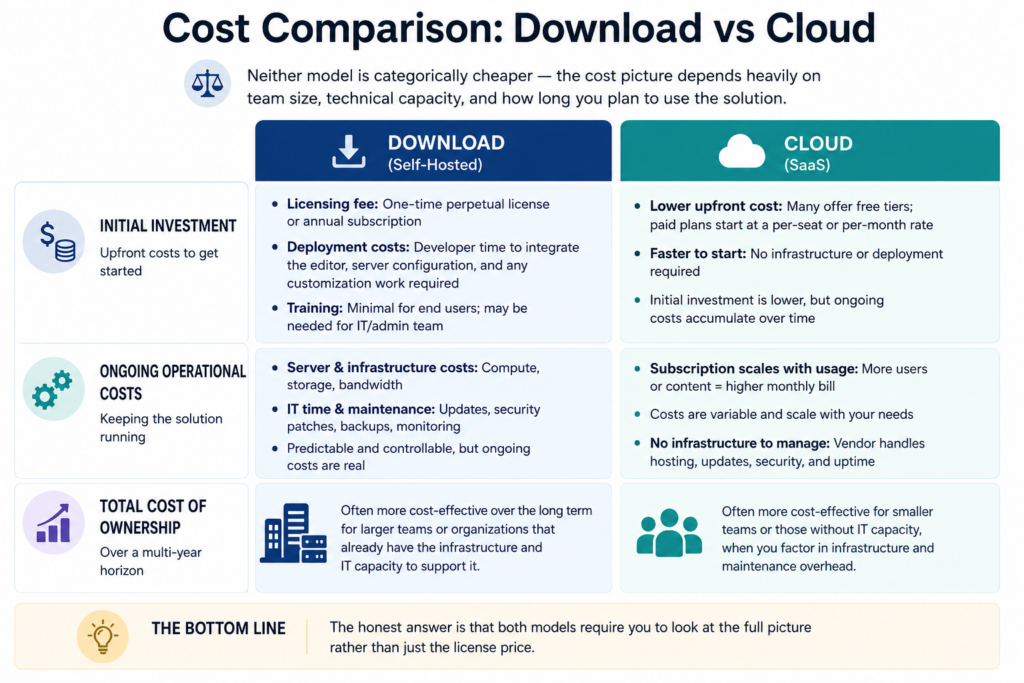
Cost Comparison: Download vs Cloud
Neither model is categorically cheaper; the cost picture depends heavily on team size, technical capacity, and how long you plan to use the solution.
Initial Investment Considerations
A text editor download typically involves a licensing fee, either a one-time perpetual license or an annual subscription. There may also be deployment costs: developer time to integrate the editor, server configuration, and any customisation work required. Training is usually minimal for end users but may be needed for the team managing the deployment.
Cloud-based editors often have lower upfront costs; some offer free tiers, and paid plans start at a per-seat or per-month rate. The initial investment is lower, but the ongoing costs accumulate in a different way.
Ongoing Operational Costs
Self-hosted deployments carry server and infrastructure costs, bandwidth, compute, and the IT time required to keep things running and updated. These costs are predictable and controllable, but they’re real.
Cloud subscriptions scale with usage. As your team grows or your content volume increases, the monthly bill goes up. The advantage is that there’s no capital expenditure and no infrastructure to maintain; the vendor handles that.
Total Cost of Ownership
Over a multi-year horizon, a downloaded editor can be significantly more cost-effective for larger teams or organisations that already have the infrastructure to support it. For smaller teams or those without IT capacity, the cloud model often wins on total cost when you account for the infrastructure and maintenance overhead a self-hosted deployment requires.
The honest answer is that both models require you to look at the full picture rather than just the license price.
Integration with Existing Systems
How well an editor integrates with what you already have is often as important as what the editor itself can do.
Downloadable Editor Integration Advantages
A text editor download is a local dependency; it integrates with your application the same way any other library does. It can access internal APIs, communicate with legacy systems that aren’t exposed to the internet, and be bundled into your existing build process.
For organisations with complex internal toolchains – CMS platforms, approval systems, content databases, this level of integration is often essential. The editor isn’t an external service that your application calls; it’s part of your application.
Cloud Platform Integration Capabilities
Cloud editors integrate primarily through APIs and webhooks. They’re designed to work well with other SaaS tools: Slack, project management platforms, publishing systems, and many offer native integrations with popular third-party services.
This is powerful for teams operating in a SaaS-first stack. If your organisation already lives in cloud-based tools, a cloud editor fits naturally into that ecosystem. If your workflow depends on internal systems that aren’t web-accessible, integration becomes more complex.
Evaluating Technical Requirements
When assessing integration requirements, consider:
- Which existing systems need to exchange data with the editor?
- Are those systems accessible from outside your network?
- How much developer time do you have available for integration work?
- What does your planned architecture look like in two to three years?
The goal is an editor that fits your actual technical environment, not one you have to build workarounds for.
Scalability and Future Growth
The choice you make today needs to hold up as your team and content needs evolve.
Scaling a Text Editor Download Solution
Scaling a self-hosted editor means scaling your infrastructure. As the user count grows, server capacity may need to increase. If the editor is embedded in an application used by thousands of users simultaneously, the deployment architecture needs to be designed accordingly from the start.
The good news is that this scaling is predictable and controllable. You’re not subject to a vendor’s pricing decisions as you grow; the costs are tied to your own infrastructure choices.
Cloud-Based Scalability Benefits
Cloud platforms scale almost transparently. Adding users is usually as simple as adding seats to a subscription. The vendor manages capacity, so your team doesn’t need to anticipate infrastructure needs months in advance.
For organisations experiencing rapid growth or seasonal traffic spikes, this elasticity is a genuine advantage. There’s no lag between needing more capacity and having it.
Planning for Long-Term Success
Whichever model you choose, factor in:
- How your team size is expected to grow over the next two to three years.
- Whether your compliance requirements are likely to increase or change.
- How is your technology stack evolving? Are you moving toward or away from cloud infrastructure?
- Whether vendor lock-in is a concern if you go cloud-based.
How to Choose the Right Option for Your Team
With all of these factors in view, here’s a structured way to work toward a decision.
Assessing Team Needs
Start with the non-negotiables. If your organisation operates under regulations that require data to remain on controlled infrastructure, a text editor download is likely your only compliant option. If real-time collaboration is a core requirement and your team is geographically distributed, a cloud platform has a structural advantage.
Map out the editing workflows that matter most: Who creates content? Who reviews it? Where is it published? The tool should fit those workflows, not require workflows to be redesigned around it.
Identifying Organisational Priorities
Beyond the technical requirements, consider:
- Budget structure: Is a predictable monthly subscription preferable, or do you want a one-time cost?
- IT capacity: Do you have the team to manage a self-hosted deployment?
- Vendor dependence: How comfortable is your organisation with relying on a third-party platform for a core function?
- Compliance roadmap: Are your data requirements likely to become more strict in the near future?
Building a Decision Framework
A simple framework for the final call:
If you answer yes to any of the following, a text editor download is likely the stronger fit:
- Strict data residency or compliance requirements
- Need for offline functionality
- Deep integration with internal or legacy systems
- A large user base where a perpetual license is more cost-effective
- Requirement for extensive customisation
If you answer yes to any of the following, a cloud-based editor is likely the stronger fit:
- A distributed or remote team requiring universal access
- Real-time collaboration is a primary workflow requirement
- Limited IT capacity for infrastructure management
- A rapidly scaling team that needs elastic capacity
- Primarily SaaS-based technology stack

Conclusion
Neither model wins across the board. The best text editor for your team is the one that fits your actual operating context, your compliance posture, your team structure, your technical environment, and where you’re headed.
Text editor downloads give you control, customisation depth, and a compliance-friendly deployment model that suits regulated industries and organisations with mature IT infrastructure. Cloud-based editors give you accessibility, real-time collaboration, and lower operational overhead, advantages that matter enormously for distributed teams or organisations that want to keep their internal toolchain light.
Froala’s downloadable editor is worth evaluating if you’re leaning toward the self-hosted path; it has a straightforward integration model, a strong plugin ecosystem, and the kind of customisation flexibility that makes it work well alongside complex internal systems. But as with any tool, run a proof of concept against your actual requirements before committing.
The framework in this guide gives you a starting point. The decision ultimately comes down to honest answers to a small number of questions: Where does your data need to live? How does your team actually collaborate? What technical resources do you have to support and maintain the solution? Answer those clearly, and the right choice tends to become obvious.
Frequently Asked Questions
What is a text editor download?
A text editor download is editing software installed and deployed within your own infrastructure, rather than accessed through a third-party cloud service. It may be integrated into an application as a library, hosted on an internal server, or run locally. The defining characteristic is that the software and its data remain within an environment you control. Common use cases include regulated industries, applications requiring offline functionality, and organisations that need deep customisation of editor behaviour and output.
Is a text editor download more secure than a cloud-based editor?
It depends on who’s doing the securing. A self-hosted editor gives you full control over your security policies, access controls, and data handling, which is an advantage if your organisation has the resources and expertise to manage that well. A cloud-based editor from a reputable vendor may actually be more secure for smaller organisations that lack dedicated security infrastructure, since the vendor invests heavily in encryption, access management, and incident response. The honest answer is that security is about implementation and governance, not the deployment model alone.
Which option is better for remote teams?
Cloud-based editors generally have a structural advantage for remote and distributed teams. Browser-based access means any team member can edit from any device without VPN or installation requirements. Real-time collaboration features are particularly valuable when team members are working across time zones. That said, downloadable editors can work well for remote teams if collaboration happens through version control systems or async review workflows rather than simultaneous editing; the right fit depends on how the team actually works.
Can downloadable editors support collaboration?
Yes, though the collaboration model differs from cloud platforms. Downloaded editors support shared internal workflows, where content passes through structured review and approval processes rather than simultaneous real-time editing. Version control systems like Git can manage content history and change tracking. For teams that are comfortable with this kind of async collaboration model, common in engineering and technical writing teams, a downloaded editor handles the workflow well.
How do I choose between a text editor download and a cloud-based editor?
Start with your constraints: data residency requirements, internet availability, and compliance obligations may narrow the field quickly. Then evaluate collaboration needs; if simultaneous real-time editing is important, cloud platforms have a structural advantage. Consider your team’s IT capacity and whether self-hosting is a realistic operational commitment. Finally, think about the total cost over two to three years rather than just the upfront price. Running a short proof of concept with your actual content workflows, rather than evaluating editors in isolation, will give you the most reliable signal.
More Stories
How the CloudySocial Team Organizes Tech Help Content
CsTechHelp CloudySocial Recap: Highlights, Lessons, And What’s Next (2026)
CloudySocial CSHardware Promo Code: How To Save On Gaming Gear In 2026